
SEO service pages are the pages that describe one service and are built to rank for it, and for a home service business, they’re often the hardest-working pages on the whole site. Done right, a service page shows up the moment someone searches for that exact job, and it convinces them to call. Done halfway, it’s a thin paragraph that ranks for nothing. Here’s how to write one that pulls off both the ranking and the booked work.
Give Every Service Its Own Page
The first mistake is cramming every service onto one “Services” page. Google ranks pages, not businesses, so a page that tries to cover plumbing, drain cleaning, and water heaters at once gives it nothing specific to rank. Split them. One page for each core service, each one focused on a single job and the words people use to search for it.
Write A Title Tag And H1 That Match The Search
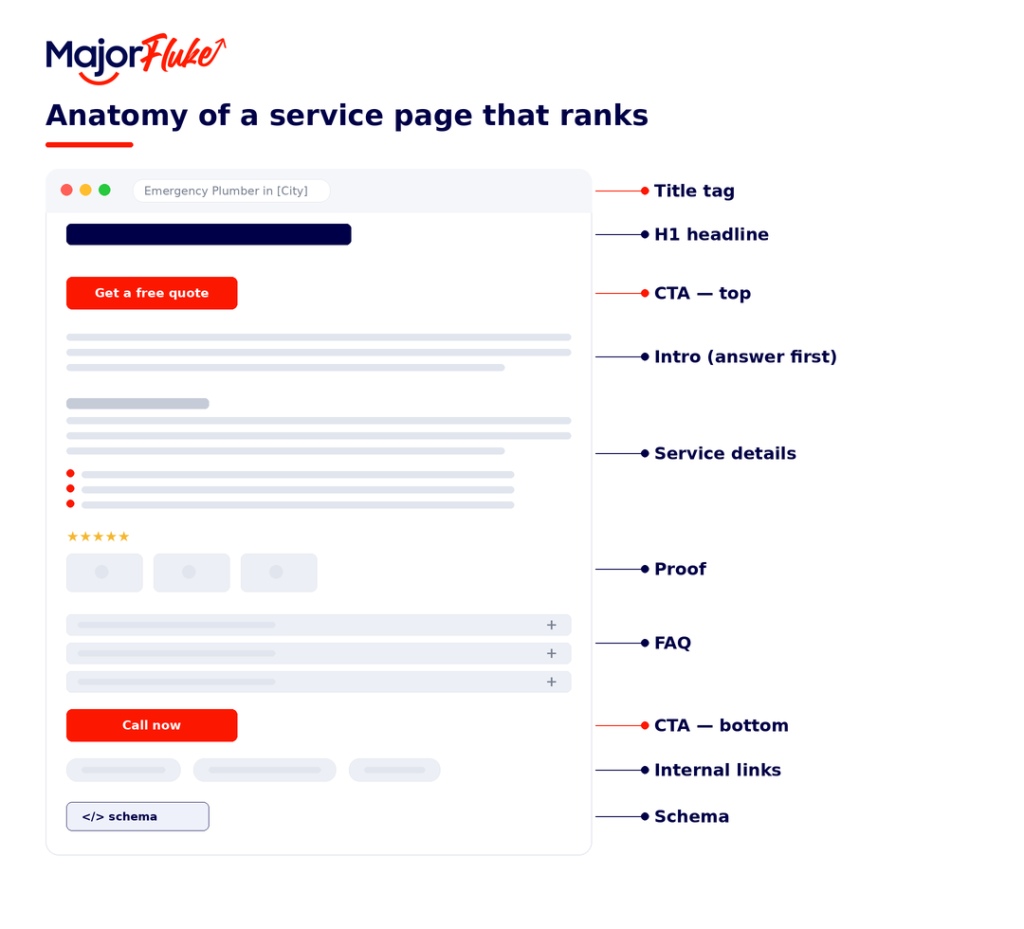
Your title tag is the clickable headline in search results, and it’s one of the strongest on-page ranking signals you have. Lead with the service and the city, since that’s what people type and what Google matches. Your H1, the visible headline at the top of the page, should say the same thing in a natural, human way. The two work together, one for the search engine and the searcher scanning results, one for the visitor who just landed.
Structure The Service Description So It Ranks And Reads Well
Open with the answer. In the first two sentences, say what the service is, who it’s for, and where you offer it, so both the reader and Google’s AI know they’re in the right place. Then give the specifics that thin pages skip.
- What the service includes, step by step.
- How your process works and what to expect.
- Why you’re the right choice, with proof like reviews, photos, guarantees, and credentials.
- The problems it solves, in the words customers actually use.
Break it up with descriptive subheads, work your service and location in naturally rather than stuffing them, and write like a person explaining it to a neighbor. A page that genuinely answers the question outranks one padded with keywords.
Add An Faq Section
An FAQ near the bottom does double duty. It answers the real questions that make someone hesitate before calling, and it hands you clean, question-based content that search engines and AI can lift straight into results. Pull three to six questions your customers actually ask, cost, timing, guarantees, what’s included, and answer each one in a couple of honest sentences.
Point Visitors Toward The Next Step With CTAs
A service page that ranks but never asks for the call is a leak. Tell the visitor exactly what to do next, and make it easy. A clear call to action near the top for the ready-to-buy, and another at the bottom for the reader who needed convincing, covers both. Use action words that match the job, “Get a free quote,” “Schedule your inspection,” “Call now for same-day service,” rather than a limp “Submit.”
Link The Page Into Your Site
A service page shouldn’t sit on an island. Link to it from your main services page and your homepage, and link out from it to related services and your contact page. Those internal links help Google understand how your site fits together and pass ranking strength to the pages that need it. This is one of the most overlooked on-page SEO strategies, and it costs you nothing but a few minutes.
Add Service Schema So Search Engines Get It
Schema is code that labels your page for search engines, telling them this is a service, here’s the area it covers, here’s the FAQ. It doesn’t change what visitors see, but it helps you qualify for rich results and makes your page easier for AI to quote. Add Service schema for the page itself and FAQ schema for your questions.
The Service Page Checklist
Everything above comes down to a handful of elements, done well, on a single focused page. Here’s the quick version to check every service page against before it goes live.
| Element | What to Include |
| Title tag | The service and city, under about 60 characters |
| H1 | One clear headline naming the service |
| Intro | The answer first, what you do and where |
| Service details | Specifics, your process, what’s included, and why to choose you |
| Proof | Reviews, photos, guarantees, and credentials |
| FAQ | Three to six real questions customers ask |
| CTA | One clear next step, near the top and the bottom |
| Internal links | To related services and your contact page |
| Schema | Service and FAQ structured data |
You Do The Work. We’ll Write The Page That Ranks It.
A great service page takes research, structure, and the on-page details most businesses skip, and that’s exactly what we handle. We’ll build pages that rank for the jobs you want and turn searchers into booked work. SEO, content, and the technical side, the whole mix, handled. Talk to the team and let’s get your services found.
Frequently Asked Questions About SEO Service Pages
How long should a service page be?
Long enough to answer the question fully, usually somewhere from 500 to 1,000 words for a home service. Depth matters more than a word count. Cover what the service includes, your process, proof, and the questions customers ask, and stop when you’ve genuinely answered them.
Do I need a separate page for every service?
Yes, for every core service you want to rank for. One focused page per service gives Google something specific to match and gives the visitor a page built around exactly what they searched for. Grouping everything onto one page waters all of it down.
How many service pages should a home service business have?
As many as you have distinct services worth ranking for, often somewhere between five and fifteen. Build a page for each real service, not a thin page for every tiny variation, and expand as you add offerings.
Can I use the same page for different cities?
Only if each page has genuinely unique, local content. Duplicating a page and swapping the city name gets flagged as spam. If you serve several areas, write real location-specific pages or focus on one strong page and cover your service area within it.